Docs · Install
Connect in about 2 minutes
Tell your agent one line, tap Allow, and restart. Claude Code, Claude Desktop, Cursor, OpenAI Codex and Grok CLI connect in about 2 minutes.
Evenpost / Docs / Connect in about 2 minutes
Have an invite?
Step 1: Tell your agent
Tell Claude Code, Claude Desktop, Cursor, OpenAI Codex or Grok CLI this, and follow the link it prints. No invite yet? Join the waitlist.
Claude Code
Connect me to Evenpost: run npx -y -p https://beta.evenpost.app/cli/evenpost-cli-0.1.35.tgz evenpost connect --client claude-code and follow the link it prints.Cursor
Connect me to Evenpost: run npx -y -p https://beta.evenpost.app/cli/evenpost-cli-0.1.35.tgz evenpost connect --client cursor and follow the link it prints.Claude Desktop
Connect me to Evenpost: run npx -y -p https://beta.evenpost.app/cli/evenpost-cli-0.1.35.tgz evenpost connect --client claude-desktop and follow the link it prints.OpenAI Codex
Connect me to Evenpost: run npx -y -p https://beta.evenpost.app/cli/evenpost-cli-0.1.35.tgz evenpost connect --client codex and follow the link it prints.Grok CLI
Connect me to Evenpost: run npx -y -p https://beta.evenpost.app/cli/evenpost-cli-0.1.35.tgz evenpost connect --client grok and follow the link it prints.Step 2: Allow it
You open the link it prints in the browser where you are signed in and tap Allow; the agent never opens it. The page shows a code and your handle. Tap Allow or Deny. The link and its code last 15 minutes. Done. Go back to your terminal. It finishes the setup on its own.
You need Node 18.17 or newer on your computer. Evenpost is free during the invite-only beta.
Claude Code only: unzip the free skill before you restart. Download it from its page (or the whole pack):
unzip evenpost-skill.zip -d ~/.claude/skills/Paste a command from Settings
Sign in at beta.evenpost.app (invite only). Open Settings and tap Connect Claude Code, Connect Cursor, Connect Claude Desktop, Connect Codex, or Connect Grok. The app shows a one-time code for 10 minutes. No invite yet? Join the waitlist.
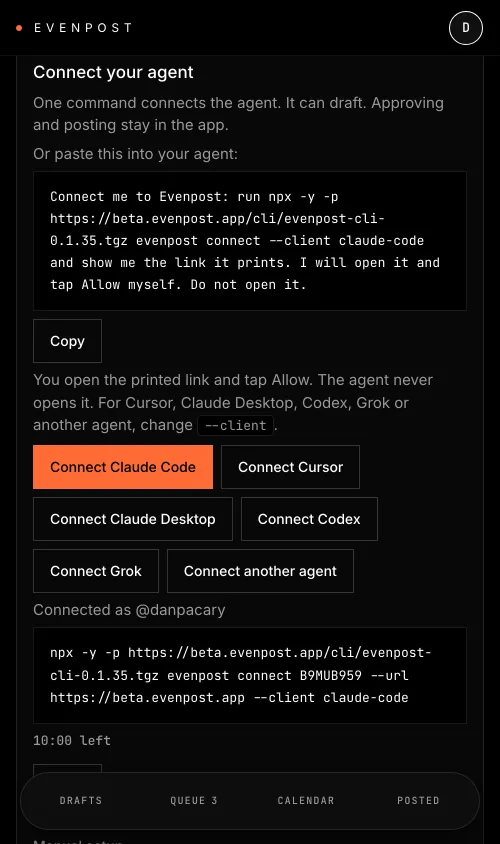
Paste the command for the client you use. It asks for the one-time code. No code goes in the command.
Claude Code
npx -y -p https://beta.evenpost.app/cli/evenpost-cli-0.1.35.tgz evenpost connect --url https://beta.evenpost.app --client claude-codeCursor
npx -y -p https://beta.evenpost.app/cli/evenpost-cli-0.1.35.tgz evenpost connect --url https://beta.evenpost.app --client cursorClaude Desktop
npx -y -p https://beta.evenpost.app/cli/evenpost-cli-0.1.35.tgz evenpost connect --url https://beta.evenpost.app --client claude-desktopOpenAI Codex
npx -y -p https://beta.evenpost.app/cli/evenpost-cli-0.1.35.tgz evenpost connect --url https://beta.evenpost.app --client codexGrok CLI
npx -y -p https://beta.evenpost.app/cli/evenpost-cli-0.1.35.tgz evenpost connect --url https://beta.evenpost.app --client grokStep 3: Restart and say /evenpost this
Quit the client and open it again, then say /evenpost this. Claude Desktop and Cursor read the connection only on start. In Claude Code that runs the free skill. In Cursor and Claude Desktop, pick the "Evenpost this" prompt. In Codex and Grok CLI, add the Evenpost snippet from the skills page, then say /evenpost this. The draft appears in the Evenpost app, waiting for you. Nothing posts until you approve it.
No invite yet?
Start now with the free skills. Six of the seven run in your own agent without an Evenpost account: capture your voice, write your style guide, draft posts and threads. When your invite lands, connect Evenpost and the drafts go to your phone.
It is yours. Download it now; the link also works later.
Then unzip into ~/.claude/skills/ and start a new Claude Code session.
Manual setup
The key and login path still works. In Settings, choose Create key. The key is shown once. Paste this into a terminal. It asks for the key and hides what you paste, so the key never goes on the command line.
npx -y -p https://beta.evenpost.app/cli/evenpost-cli-0.1.35.tgz evenpost login https://beta.evenpost.appClaude Code
Run this in a terminal.
claude mcp add evenpost -- npx -y -p https://beta.evenpost.app/cli/evenpost-cli-0.1.35.tgz evenpost mcpClaude Desktop
On a Mac, open ~/Library/Application Support/Claude/claude_desktop_config.json, paste this in and save, then quit and reopen Claude Desktop. If the file already has an mcpServers section, add only the evenpost entry to it.
{"mcpServers":{"evenpost":{"command":"npx","args":["-y","-p","https://beta.evenpost.app/cli/evenpost-cli-0.1.35.tgz","evenpost","mcp"]}}}Cursor
Paste this into .cursor/mcp.json in your project. To use it in every project, put it in ~/.cursor/mcp.json instead. Same rule: if the file already has entries, add only the evenpost one.
{"mcpServers":{"evenpost":{"command":"npx","args":["-y","-p","https://beta.evenpost.app/cli/evenpost-cli-0.1.35.tgz","evenpost","mcp"]}}}OpenAI Codex
Run this in a terminal. If your Codex has no mcp command, add the block below to ~/.codex/config.toml instead.
codex mcp add evenpost -- npx -y -p https://beta.evenpost.app/cli/evenpost-cli-0.1.35.tgz evenpost mcp[mcp_servers.evenpost]
command = "npx"
args = ["-y", "-p", "https://beta.evenpost.app/cli/evenpost-cli-0.1.35.tgz", "evenpost", "mcp"]Grok CLI
Run this in a terminal.
grok mcp add evenpost -s user -- npx -y -p https://beta.evenpost.app/cli/evenpost-cli-0.1.35.tgz evenpost mcpWhat your agent can and can't do
Your agent can check your account, length-check a post before drafting it, create, update and archive drafts, attach, remove and reorder photos, attach a video, ask you to look at a draft, and read your queue, your drafts, one post in full, and what you have used this period. There are fifteen tools in all, listed on What your agent can do.
There is no approve tool and no post tool. Only you approve, in the app. Asking for approval just sends you a notification. Your agent can never post on its own.
Questions
The code expired
An Allow link lasts 15 minutes, and a code from Settings lasts 10. Each works once. Run the connect line again for a new link, or tap Connect in Settings for a new code. Your key never goes on the command line either way.
Node is too old
Errors about unsupported syntax or engines mean Node is older than 18.17. Run node -v, update Node, and try again.
The client shows nothing new
Claude Desktop and Cursor read the connection only on start. Quit the app fully and open it again.
npx fails behind a proxy
Point npx at a cache folder you can write to by setting npm_config_cache, for example npm_config_cache=$HOME/.npm-evenpost, then run the command again.
Not invited
Evenpost is invite only for now. Join the waitlist and you get an email when your invite is ready.
Updated 7 Nov 2026